LuckyWave Mobile App and Mobile Casino
 Available in GB
LuckyWave currently promotes mobile app access for iPhone/iPad and Android through its own install page. The official page describes the app as including slots and live-casino games, while the wider LuckyWave mobile interface also links sports betting. For a user deciding whether to install it, the safest practical rule is simple: start from LuckyWave’s official install page and follow the platform link presented there rather than downloading an APK from an unknown mirror or relying on a third-party download claim.
The official page also displays ratings, review counts and download-style marketing figures, but the mobile information does not treat those on-page numbers as independent Apple App Store or Google Play verification. The useful verified facts are the device families LuckyWave promotes and the product areas it says the mobile experience includes. Performance, battery use and store ranking would require separate independent testing.
Table of Contents
- Is there a LuckyWave app?
- Use the official install route, not an unknown APK mirror
- What LuckyWave says the mobile app includes
- Slots on mobile
- Live casino on mobile
- Sports betting access
- Payments and account use on mobile
- A verification-first install checklist
- Performance evidence
- How the app fits into the wider LuckyWave site
- Bottom line on the LuckyWave app
Is there a LuckyWave app?
Yes. LuckyWave’s official install page currently promotes app access for iPhone and iPad and also presents an Android installation route. The page markets the mobile product around casino play and displays sections for slots and live games. LuckyWave’s main site also exposes a sportsbook and repeats iOS and Android app links in its mobile-oriented navigation.
That is enough to verify that LuckyWave actively promotes mobile app access across the two major device families. It does not, by itself, establish the app’s current ranking, review score or download total in an independent app store. Those marketing figures appear on LuckyWave’s own page, so they should be treated as first-party claims unless separately confirmed in the relevant store.
For most users, the platform question is therefore straightforward: iPhone/iPad and Android are the device families explicitly promoted. The next question is how to install safely and what parts of the LuckyWave service the mobile product is designed to expose.
Use the official install route, not an unknown APK mirror
The most important mobile safety step is source verification. Start from LuckyWave’s official website, open the install-app page and use the platform link shown there. That reduces the risk of downloading a modified package that merely uses the LuckyWave name or logo.
Android users should be particularly cautious with third-party APK directories. An APK file can be distributed outside a mainstream app store, but the existence of a file on a download site does not prove that it is current, authentic or unmodified. If LuckyWave’s own install flow changes, follow the current instructions on the official domain rather than an old tutorial or cached download link.
iPhone and iPad users should apply the same principle. Use the official LuckyWave install page as the starting point and confirm where its current iOS button leads. Do not infer an Apple App Store listing from a logo or image alone. Store availability can vary over time and by region.
What LuckyWave says the mobile app includes
The current official install page describes slots and live casino as core app content. LuckyWave’s wider site also provides sports betting and displays mobile app links from the sportsbook. Taken together, the first-party evidence supports a mobile experience spanning casino games, live dealer content and sportsbook access.
For casino users, this connects directly to the broader casino game library, which is organised around a 2,000+ library with category and provider filters. The app page does not need to reproduce that full catalogue. Its significance is that mobile access is presented as another route into the same major product areas.
For live-dealer users, LuckyWave specifically promotes live games on mobile. The live dealer games guide maps the current roulette, blackjack, baccarat, poker and game-show categories. Table performance and availability can vary by device and session.
Slots on mobile
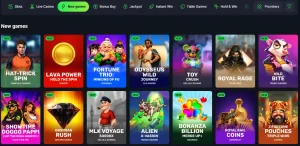
Slots are one of the clearest advertised parts of the LuckyWave mobile product. The install page labels slots as a core app area, while the main casino catalogue contains extensive slot filtering by provider, game mechanic and release group.
On a phone, those filters matter because a catalogue with thousands of titles can otherwise become cumbersome. A practical way to browse is to choose a category such as new games, jackpots or a provider first, then open individual titles. That reduces unnecessary scrolling and makes the mobile catalogue easier to navigate.
The mobile information does not rate touch controls, animation smoothness or loading speed because those points depend on the specific game, handset, operating-system version and network. They would require direct performance testing rather than inference from the existence of an app.
Live casino on mobile
LuckyWave’s install page states that live casino tables are part of the mobile product. That is consistent with the dedicated live-casino catalogue on the website, which currently includes roulette, blackjack, baccarat, poker, game shows and other live formats from multiple providers.
For users who mainly play live games, the mobile benefit is access rather than a different catalogue promise. Category filtering can help narrow the lobby before a table is opened. Specific stream resolution, frame rate, latency and data usage remain unverified because those metrics were not independently tested.
If mobile live casino is the main reason for installing, verify the exact table you want after signing in rather than assuming every desktop-listed table will always appear on every device or account. Catalogue availability can change and some providers may present device-specific differences.
Sports betting access
LuckyWave also operates a sportsbook, and its sports page includes links to get the app for iOS and Android. This supports the brand’s broader positioning of mobile access as covering more than casino games alone.
A user who moves between sports and casino therefore has a reason to prefer a unified mobile route. Even so, the presence of both products does not tell you whether a particular sports market, bet type or event will be available at a given moment. Sportsbook content is time-sensitive and should be checked directly in the current interface.
The relevant mobile facts concern access and product scope; sports odds, market depth and betting recommendations require separate evidence. Those would be separate questions requiring their own current evidence.
Payments and account use on mobile
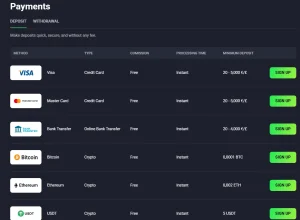
Mobile access also intersects with deposits, withdrawals and account management. LuckyWave publishes a cashier with card, bank and cryptocurrency options, and those payment questions are covered in the payment methods guide. The existence of a mobile app should not be read as a promise that every payment method is available on every device, country or account.
When funding an account from a phone, verify the method, minimum amount and any displayed instructions in the current cashier before confirming the transaction. Payment pages can change more frequently than a general app guide, and method availability may depend on account context.
Likewise, a mobile interface does not remove ordinary account checks. Registration and verification requirements belong to the account process. The account setup guide covers that process without duplicating it here.
A verification-first install checklist
Before installing, first confirm that you are on the official LuckyWave domain. Second, navigate to the current install-app page rather than following an old third-party tutorial. Third, use the iOS or Android route presented there and inspect the destination before approving installation. Fourth, avoid APK mirrors or download portals that cannot demonstrate a direct connection to LuckyWave.
After installation, compare the app identity with the information presented on the official site. If the app requests unusual permissions unrelated to its function, stop and review them before proceeding. Keep the operating system current and use the normal device security controls rather than disabling protections simply to make an installation work.
Finally, remember that first-party ratings or download counters are marketing information unless independently verified in a platform store. They can be displayed on the brand’s page without being equivalent to a current store listing. This distinction is especially important when deciding whether a mobile download is authentic.
Performance evidence
LuckyWave’s own install page uses positive language about smooth gameplay and includes user-style review content. Those statements are not a substitute for independent testing. Those statements provide no independent basis for claims about freezing, battery use, switching speed or live-stream clarity.
Mobile performance depends on variables that a static review cannot control: handset model, OS version, available memory, network quality and the individual game provider. A user deciding whether the app performs well on a particular device should test ordinary navigation and a low-risk session on that actual device rather than relying on a generic performance promise.
This distinction remains useful as device support and app builds change. Device support and app builds can change, while the verified core fact is that LuckyWave currently promotes mobile access for iPhone/iPad and Android with casino and sportsbook content.
How the app fits into the wider LuckyWave site
The app is best understood as a mobile access layer over LuckyWave’s major product areas, not as a completely separate service. Slots and other casino content come from the main game catalogue, live tables come from the dedicated live lobby, sports betting comes from the sportsbook and payments remain an account-level cashier function.
That means users do not need to evaluate every topic from the app page alone. If the main question is game depth, use the games guide. If it is live dealer choice, use the live-casino page. If it is deposit or withdrawal options, use the payments page. If it is account setup, use the registration page.
Keeping mobile access separate from the wider casino product avoids duplicating unrelated details. The practical mobile question is whether LuckyWave provides an official route for the device in use and whether that route can be verified before installation.
Bottom line on the LuckyWave app
LuckyWave currently promotes app access for iPhone, iPad and Android. Its official install page presents slots and live casino as core app content, and the wider site connects mobile users to sports betting as well. That makes the app relevant to users who want one mobile route into several parts of the LuckyWave service.
The most important caution is verification, not feature count. Use the official LuckyWave install page as the starting point, avoid unknown APK mirrors, and do not treat ratings or download figures shown on LuckyWave’s own page as independent app-store evidence unless you can separately confirm them. Performance claims should also be tested on the actual device rather than assumed from marketing copy.
For the full brand overview, return to the LuckyWave review.